
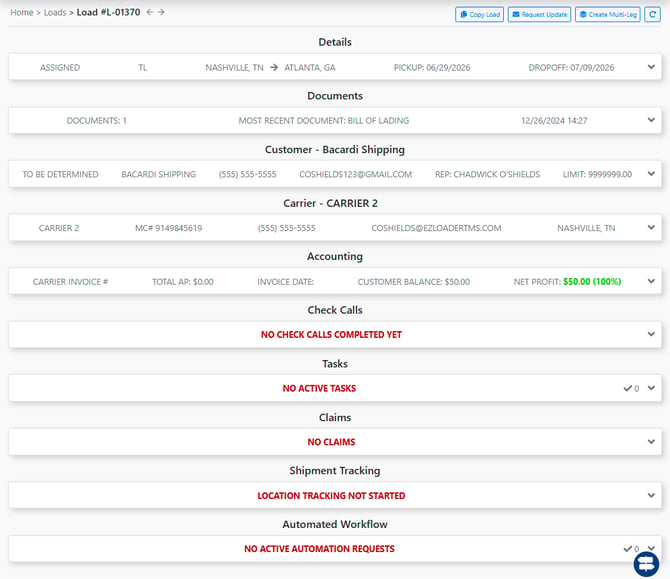
Details
Within the Details section of a load profile, you can quickly view lane information, load status, assigned sales reps, and key details and notes about the load’s contents and progress through its lifecycle.
CLICK HERE for more information on the Details Section
Documents
Documents associated with the load can be entered and reviewed in this section
CLICK HERE for more on the Documents Section
Customer
The Customer section holds key information from the customer profile so you can quickly identify which customer the load is assigned to.
CLICK HERE for more on thee Customer Section
Carrier
The Carrier section displays which carrier is currently assigned to the load. If the load is in AVAILABLE status, you can assign a Carrier to the load in this section, or click FREIGHT MATCHING to dispatch a tender to carriers that have previously run this lane for you
CLICK HERE for more on the Carrier Section
Accounting
The Accounting section stores the customer and carrier rates for the load. Use this area to apply pricing adjustments, add Other Costs, or upload Customer/Carrier Checks.
Click Here For more on the Accounting Section
Check Calls
The Check Call section provides an auditable record of the load’s status updates. Each check call entry includes a name and timestamp that can be added by simply selecting the checkbox next to the appropriate status.
CLICK HERE for more on the Check Calls Section
Tasks
Tasks can be created at the load level, allowing users to set reminders for themselves or assign action items to other team members directly within the load profile.
When a task reaches its "set deadline" a notification will be displayed for the User that the Task was assigned to. Notifications for upcoming tasks are displayed via the Notification Bell at the top of the screen.

Claims
The Claims section is used to document any claims associated with a load. When you select “Claim on Load,” additional cards appear so you can capture all relevant claim details.
Shipment Tracking
This section displays data from your tracking integrations, including location ping updates and a live Google Maps view of the load.