If you are interested in joining Triumph, email support@ezloadertms.com and we can put you in contact with our Triumph reps!
Overview:
- New carrier profile data is automatically submitted hourly to the Triumph platform.
- Once a load passes through the invoicing page, EZ TMS will consolidate load data and related invoicing documents and submit it to the Triumph platform.
Setup:
-
Contact support@ezloadertms.com and copy in your Triumph rep (if you have one assigned) and our support team will assist with establishing the connection to Triumph.
Carrier Profile Submission:
-
Once a carrier is active within EZ TMS the system will automatically submit the carrier info to the Triumph platform on an hourly schedule.
Invoice Submission:
-
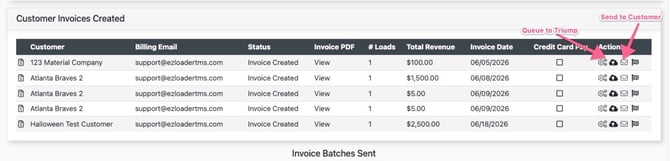
Once a load moves to the invoicing page and the invoice is generated, you will see two icons. The envelope icon sends an invoice PDF packet to your customer recipient and the cloud icon puts the invoice on the queue to go over to Triumph during the scheduled runs. Note: If Invoicing your customer directly you will always want to select the envelope icon first.
- Note: The Invoices that have been queued to Triumph are sent over twice a day. 10:45 AM CST & 4:45 PM CST
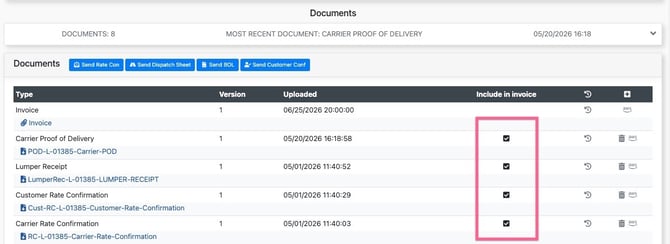
Selecting Documents for Invoicing
-
There are two different invoice "versions" you send when a Triumph Integration is live. One version that is sent to Triumph (using the cloud icon) and contains all customer and carrier related documents. The second version is intended for your customer (using the envelope icon) and excludes certain carrier documents such as a Carrier Invoice or Carrier Rate Confirmation.
- On the load page select the "include in invoice" checkbox next to the documents you want to be included in the invoice packet sent to Triumph. EZ TMS will automatically remove certain carrier documents (ex. carrier invoice) from the version that is sent to the customer.