
EZ Loader Quickbooks Online Sync Schedule
Customer Invoice / Carrier Bill sync EZL to QBO
- 7:00 AM - 11:00 PM EST every two hours
Criteria to Trigger a Customer Invoice Sync
- Customer Profile must have Billing information
- There must be a Customer Invoice date in the Load profile
- The Balance Due on the load must be greater than $0
How the Invoice Sync Logic Works:
When a customer invoice meets all the specified sync criteria, the system will identify the corresponding Customer profile in QBO where the invoice should be recorded. Initially, it will search for an existing QBO ID within the EZL Customer profile. This QBO ID serves as a unique identifier generated by QBO, enabling EZL to accurately determine which profile to associate with the invoice.
If there is no existing QBO ID in the EZL customer profile, which is often the case during the first syncing of a customer invoice for the specified customer, the system will utilize the customer’s billing name to search for a corresponding record in QBO. This search may yield multiple results.
- The system will find an appropriate match in QBO, grab the corresponding sync ID, record that ID in the EZL profile for future use and sync the customer invoice.
- The system will not find any matches. In this scenario EZL will create a new customer profile in QBO, record the ID in the EZL profile for future use and sync the customer invoice.
- The system finds multiple approximate matches, is unable to create a connection to avoid linking to the incorrect profile and records and sync error. (See video below for how to handle the error)
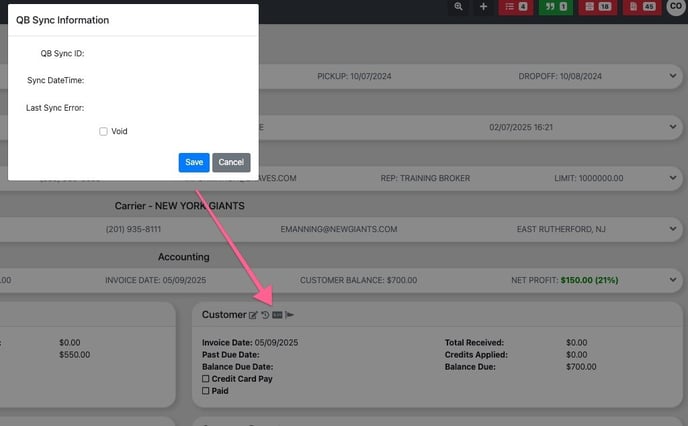
Upon the completion of a sync, whether successful or not, you can view the results in the QBO sync card located within the account section of the load profile. A successful sync will be indicated by a QBO sync ID and a Sync DateTime. Conversely, if the sync fails, an error message will be provided to help identify the issue.
What to do if the initial Sync of a Customer or Carrier (Vendor) Profile Fails: