
After searching through either the Quick or Advanced load search options, a list of loads will display based on your search criteria. (You will also see a similar load list on your My Loads and New My Loads pages)
Navigating the Load List
You will notice a number of different load attributes displayed as column headers. You may edit which load attributes display by selecting the "grid data edit" Icon. Additionally you may click on one of the column headers to sort loads in either ascending or descending order based on the column header you selected.
On the Loads List page you will also see the option to export the search results as an Excel file or print / save to PDF. (Note: The excel option is only available to Admin or Accounting level users)
Selecting the "Pop-Out" Icon next to the load number will open that load profile in a new tab. EZ TMS also allows you to keep multiple load lists in one tab.
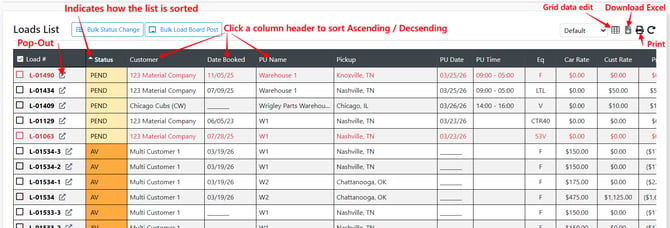
Note: There are different preset views with default attributes based around the different roles a user may have. (TL, LTL, Accounting). These presets can also be edited using the "grid data edit" icon.

Bulk Status Update
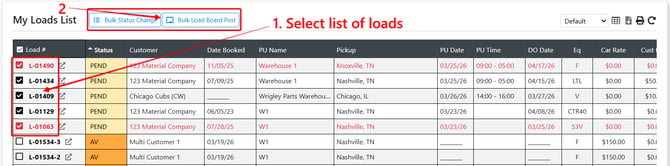
You may update the status of multiple loads at once by selecting the checkbox next to the loads you would like to update > selecting the "bulk status change" Icon > entering which status the selected loads will change to.
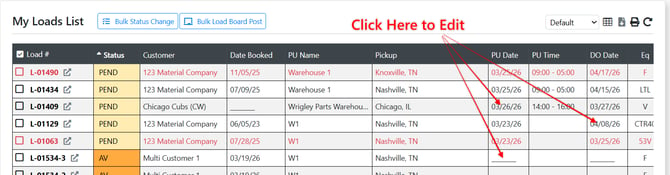
Change / Add (PU/DO) Date & Time
You can click on the pickup or drop off date (or the empty underlined space if no current date entered) to update or assign a date and time right from the loads list page.
Different Types of Load Lists Within the System
NEW My Loads - The NEW My Loads page offers users a more customizable load list that supports up to 4 different views which can be filtered on the fly.
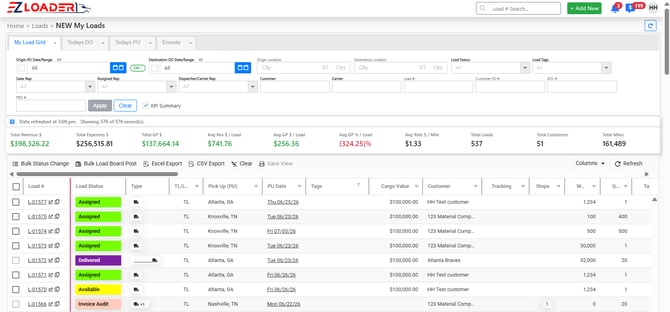
Click Here for a Video Walkthrough of this page
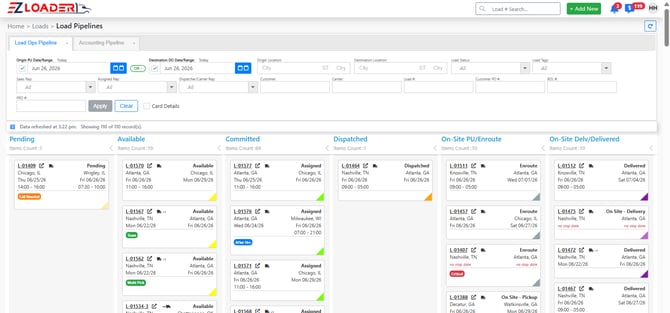
Load Pipelines - The Kanban-style load view gives users clear visibility into loads at each stage of the load lifecycle, making it easy to monitor and manage loads across different statuses.
Insert Pipeline article here