
There are two methods to send a digital rate confirmation:
Method 1
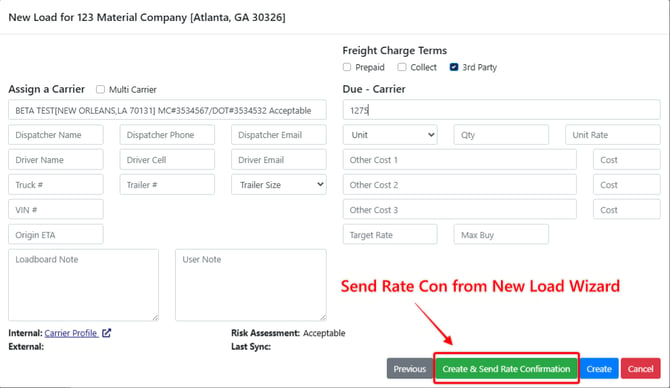
When creating a new load through the New Load Wizard, page 3 gives you the option to the option to Create the load and send a Rate Confirmation if you have a Carrier already assigned to the load.
Method 2
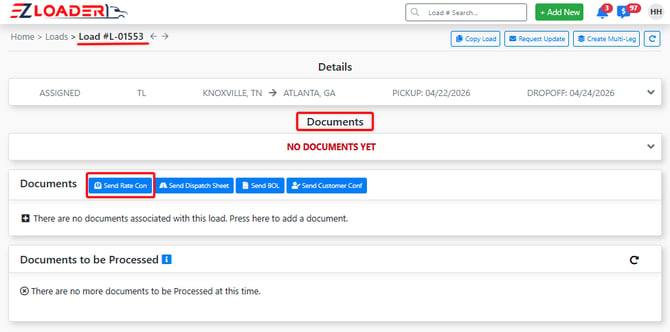
Within the documents section of a load profile, you will find the [Send Rate Con] action button.
***Note A carrier must be assigned to the load to trigger this action
Within the Send Load Rate Confirmation modal, you can choose which information to display or hide and select the recipient for the Rate Confirmation.
***Note - these settings can be adjusted by any Admin level user (Navigate to the settings page > Click On your Settings & Documents > Edit Rate Con Settings)
The Rate Con can also be previewed to verify that all necessary details are shown or suppressed before sending.
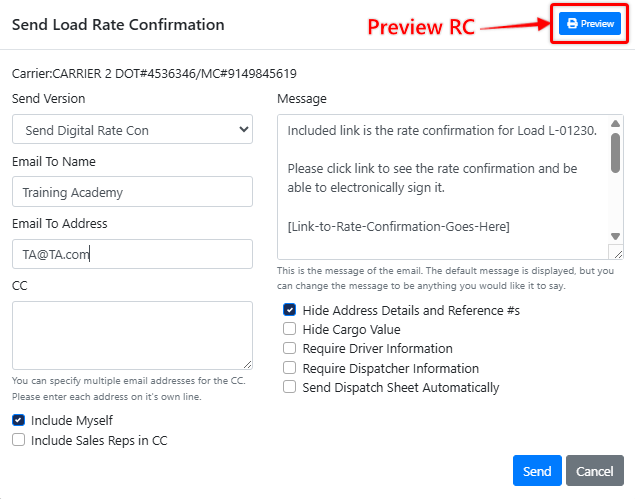
After assigning the contact and email that the Rate Confirmation will be sent to and clicking [Send], the recipient will receive the following email with a link to their Rate Con.
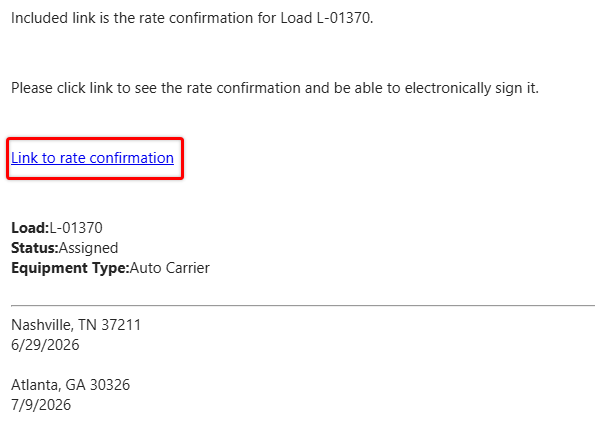
When the recipient clicks the hyperlink in the email, they are directed to the digital rate confirmation web form, where they can review the load details and apply their digital signature.
Once the rate confirmation is signed, 3 actions happen:
- PDF signed copy is sent to Dispatch/Carrier
- PDF signed copy is sent to you (sender)
- PDF signed copy is saved in LOAD PAGE > DOCUMENTS
Click Here to understand the Carrier Rate Confirmation